Why Do You Need Monster Hunter World Mods?
2025 is going to be wild for the fans of the Monster Hunter franchise. The new game with the subheading Wilds will be massive. While waiting for the release, you can make the already familiar game more interesting by installing some of the best Monster Hunter World mods.
For example, you may set up the mods through Clear Hunter and Better Skill Descriptions. These mods reshape the gameplay by sorting out unnecessary information to enhance visibility during hunts. Your attention stays on the gameplay since these modifications enhance text visibility and eliminate confusing skill descriptions.
Customization is another big win for the MonHun mod lovers. For instance, the Armor Transmog mod lets hunters maintain performance along with their preferred outfit appearance. You can put on fashionable outfits with the preserved stats of your selected armor using the customization-only Monster Hunter World mods. Through personalization, you can build a hunter that represents your identity or just looks ravishing.
There are a couple of reasons, why it is worth installing MHW mods:
- Improved clarity and usability of the user interface and menu;
- Better character customization;
- New user-generated content and challenges;
- Enhanced performance;
- Improved visual effects and animations;
- Active community engagement;
- Unique gameplay mechanics;
Types of Monster Hunter World Mods
Just like in the review about Hogwarts Legacy mods, we need to mention that there are different categories or types of Monster Hunter World mods:
- Native PC Mods. The game supports the substitution of various game elements on PC – weapons, costumes, and character models. Playing with custom armor and a distinctive weapon look is especially popular among the fans of Monster Hunter World mods. Native PC mods help to change the NPC and main character’s looks or install new armor sets;
- ReShade Presets. ReShade mods change the graphical shaders to generate impressive images. Gamers can use these settings to brighten their environment alongside color improvement and improved visuals. The visual potential of MHW can achieve unbelievable heights through ReShade presets;
- Gameplay Mods. Easy to understand, right? These mods for Monster Hunter World can help to change the core mechanisms in the system. Do you want tougher monsters? Need to adjust the level of difficulty? Or add more features to the co-op mode? Gameplay mods can do that just fine! For example, the custom quest system may add an endless stream of new challenges. There is an unofficial Monster Hunter World mods ban for gameplay changes, but mods still can do this;
- Quality of Life (QoL) Mods. They enhance gameplay while delivering smoother gaming experiences to players. “Souvenir” mod has implemented the Light Pillar feature that shows all available items in the surrounding environment. The map becomes readable and objects of all sizes become more visible without squinting because everything appears clear and easy to see. Through QoL mods, you can simplify interfaces through features that show monster weaknesses during hunting;
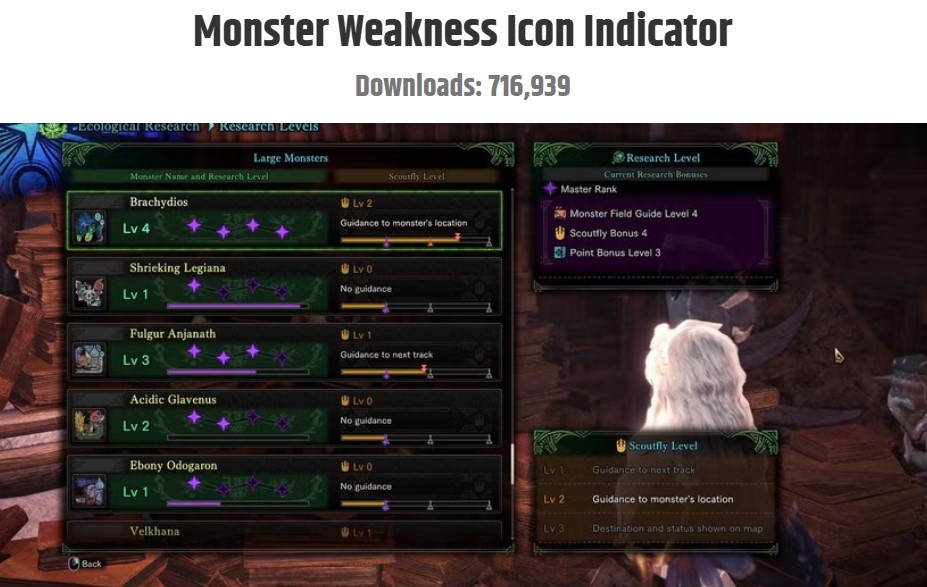
- User Interface Mods. These mods transform the game’s interface customization to the advanced level. The modifications display additional information on your viewing area that includes monster life meters along with status effect indicators near the stats for power-up and power-down notifications. For example, the Monster Weakness Icon Indicator shows the visible weaknesses of monsters directly on their displayed icons;
- Visual and Graphics Mods. Texture packs can add more detailed enhancements to create utterly vibrant environments/characters. The environment feels increased in living density while all the creatures appear more threatening which creates a deep immersion that pulls players further into the game;
- Audio Mods. Players should replace current sound effects and musical compositions with customized elements to create their desired game atmosphere. Gamers can select between deeper music scores or soft natural ambient noise to create better tension effects. Audio mod options allow you to establish the emotional state during hunting sessions;
- Utility and Tools Mods. Mod managers can help to handle numerous mods effortlessly. The simple activation or deactivation of mods through the built-in managers results in secure performance stability of the entire game;
Top 8 Best Monster Hunter World Mods
1) God Tier Cheat Weapons by SevenSins
It is one of the best Monster Hunter World armor mods. With this mod, you can upgrade basic starting weapons and armor into premium gear to kill even the strongest monsters without effort. Playing with the Dual Blades along with other initial weapons through this mod transformation leads to speedy and comedic hunts. The mod serves as an ideal choice for speedrunners who seek new ways to beat the game faster. Or for the new gamers who find it difficult to kill even the starting location’s monsters.
2) Useful Event Quest Descriptions by Fate
Useful Event Quest Descriptions improve clarity by adding deep quest information while preventing the UI mess. The mod offers precise information that enhances plan creation for hunts because it provides complete details about incentives and challenges.
3) Balanced Rewards Gain by Nozomi Miyamori
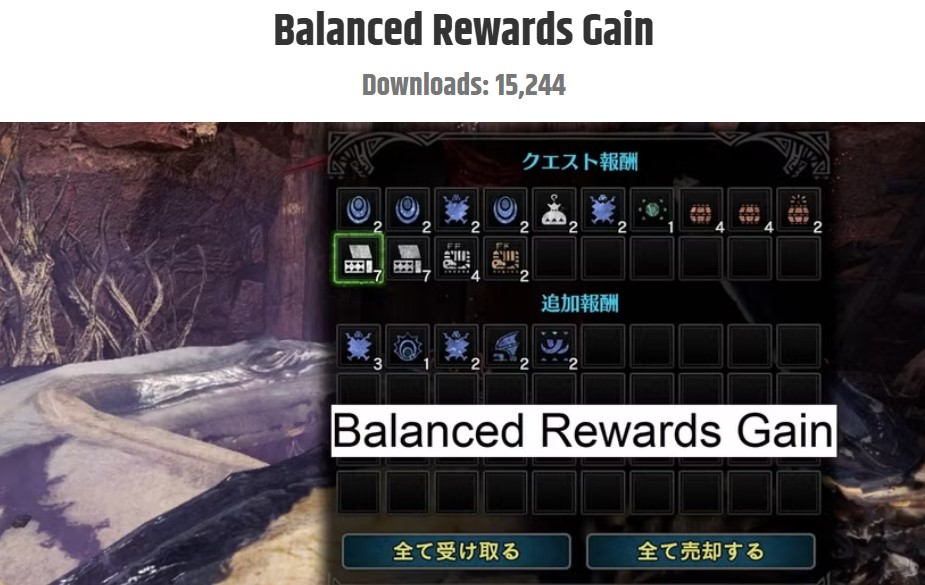
The Balanced Rewards Gain system solved the problems caused by the random number generator (RNG) for the standard loot distribution. The mod boosts the chances of rare drop events and enhances the number of prizes obtained during the grinding process. The mod adds constant valuable resources to players who want to escape constant dull hunting sessions without losing their enjoyment level.
4) All Jewels In Shop by Tactiis
The All Jewels In Shop mod allows players to purchase valuable gems directly from the in-game shop without any progress requirements. In such a way, you may skip the endgame grinding for the rarest gems. The modification changes the game balance but instead offers something convenient to veteran players since they can understand the whole game.
5) Skippable Cutscenes by Moonbunnie
The Skippable Cutscenes feature lets you skip the cutscenes. The mod bypasses the cutscenes, which saves their time while repeating hunts. Maximize the game’s efficiency by skipping unnecessary scenes from the main story while maintaining all significant narrative elements.
6) Decoration Drop Rate Overhaul by AsteriskAmpersand
The Decoration Drop Rate Overhaul adjustment system enhances the opportunity to earn important decorative items. The endgame builds heavily depend on endgame decorations, though their unpredictable drop mechanics can drive players to frustration. The mod offers massive help to players who are on the verge of giving up on the unpredictable system.
7) Unlimited Consumables by Zither6
In MHW, players need to handle consumable resources carefully due to their restricted availability. With this modification, players can endlessly use crafted consumables without any restrictions on their usage. The opposition labels this technique as cheating yet it allows players to dedicate their energy to hunting activities instead of managing supplies. The gameplay mod benefits active players who want to bypass excessive administrative tasks without resource limitations.

8) Stracker’s Loader by Stracker
Stracker’s Loader helps users to shift back to MHW’s native PC files working as the mod termination system. Stracker’s Loader functions as a backup solution that enables instant recovery of original MHW Native PC files. The tool serves as an essential element to handle several mods while keeping stability and preventing crashes. Touching one button allows users to switch between modified and unmodified game versions safely.
Where to Find Monster Hunter World Mods?
Nexus Mods
It is quite easy to search for Monster Hunter World Iceborne mods and its vanilla version if you are a regular visitor of such a huge modding community as Nexus Mods. It is simply the best place to start looking for some of the best MonHun mods. The collection on this platform includes both visual customization options and gameplay transformation modifications. The website has a straightforward search system and easy management tools for downloading mods. The reviews and ratings posted from users on the platform serve as valuable feedback to select trustworthy options.

Reddit users can recommend a vast collection of MHW mods. The subreddit communities of r/MonsterHunterWorld together with r/MHWMods are very active including the member discussions about Monster Hunter World mods. People who join these communities can both seek help for their mod questions and show off their own mod-built creations. Also, many Reddit posts help beginners figure out how to install and use Monster Hunter World mods for the first time.
Discord
There are plenty of MHW mod-specific Discord servers to support real-time interaction and support among modders and gamers. The world of modding becomes simpler to navigate thanks to the Discord links and modding guides pinned in the channels. The voice chat functions of Discord enable users to communicate and reveal new mods instantly.
Smaller Fan Communities
Fan communities should never be underestimated. Fans usually share uncommon mods and step-by-step guides through their personal blogs and forums – for example, Monster Hunter World lewd mods that can be forbidden on other platforms with strict censorship. On such smaller blogs and sites, you can find the adult and NSFW mods for Monster Hunter World to improve looks or redefine gameplay mechanics (like adding romantic relationships).
Monster Hunter World – How To Install Mods on PC
The process of installing mods for Monster Hunter World is beginner-level so far, but it is manageable. You just need to use the correct instructions. The most important notice – it is possible to install Monster Hunter World mods only on PC. There is still no support for MHW mods on consoles.
Anyhow, we recommend you precisely follow the next steps to install Monster Hunter World mods on PC:
- After making your NexusMods account and downloading the mod files, you should download WinRAR or 7-Zip as file extractors and Stracker’s Loader to handle many Monster Hunter World mods. Stracker’s Loader functions as a backup system that enables players to back up the game progress and then restore it if the mod will make the game unstable;
- Open your Downloads folder to get the mod file after its complete download. Use WinRAR or 7-Zip at the right-click to extract the file from the download folder. Check the Readme text file in the nativePC folder. The Readme file usually includes the step-by-step directions from a modder directly;
- Access your Steam library by right-clicking on the MHW icon and selecting the “Properties” option from the menu. Click “Browse Local Files” located under the “Local Files” tab. In such a way, you can open the game’s directory. Copy the nativePC folder’s contents in the extracted mod files and drop it into the MHW directory. You must select the option to replace the current files when implementing the mod;
- The MHW game should be launched through Stracker’s Loader after you install the mod. The correct loading system through this small helps prevent errors between different mods. Run the game like you always do after the completion of the launch process. The mod should be active!

If this guide seems overwhelming, there are dozens of video tutorials on YouTube you may check to see how the installation goes.
Frequently Asked Questions
Does Monster Hunter World have mods on consoles?
No, you can only use the fan-made Monster Hunter World PC mods. Capcom doesn’t encourage or support the modding tools on consoles. The modding community of the game on Steam has released multiple enhancements to gameplay and new quests as well as gameplay system modifications. People commonly search for new and hot mods through Nexus Mods.
Where can I get Monster Hunter mods?
We can’t recommend more the fan-supported Nexus Mods community. Before searching and downloading Monster Hunter World mods from this site, users must register an active account. With an account, you may quickly get access to Vortex where they can download and handle their preferred mods without difficulties.

Can I change the language in Monster Hunter World?
Game settings allow changing the language of the interface and subtitles for Monster Hunter World. If you play on a PC, then you should tweak the Steam settings. On consoles, you may need to alter the language of your consoles (change the region) to see the changes in the game.
Conclusion
The YaninaGames team continues to share the best guides for the fans of massively multiplayer and single-player games. You can find articles like this regularly posted on our website. Make sure to bookmark to follow the updates! Also, we are still searching for partners and fellow devs to work together on new gaming projects. Do not hesitate to contact us if you have something to offer! Happy gaming and developing!