When Was Phasmophobia on Xbox Released?
I still remember the first time I installed Phasmophobia on Xbox. The time was late in October 2024, near Halloween. My PC friends had long requested this review of me (and our YaninaGames team). They said, “It’s different. You will not be scared until you are being pursued by a Revenant in a corridor when your microphone keeps malfunctioning”. They were right.
Today, at the end of 2025, it is incredible how much the console game has been enhanced. If you buy Phasmophobia on Xbox now, you will get a game that is smooth, scary, and just as good as the PC version. It can even be improved if you prefer playing on a couch using a controller.
It is one thing to play horror games on the computer screen. Playing Phasmophobia on Xbox on a big 65‑inch TV in the dark is another level of horror experience. It is more intense when you see a ghost whispering in your ear, and you can’t simply avoid the game and run away to safety.
Phasmophobia on Xbox – Overview of Major Aspects
Performance and Gameplay
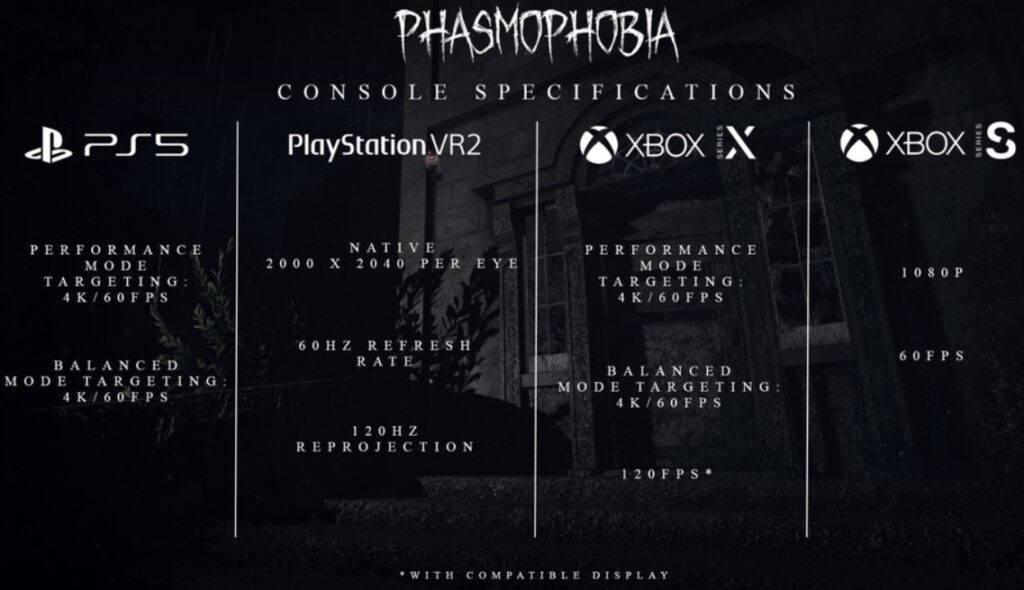
The biggest question to ask before the launch of Phasmophobia on Xbox, will work properly. The answer is yes. Phasmophobia on Xbox runs smoothly. On the Series X, it targets 4K and can reach 120 frames per second if your TV supports it. That is a big achievement. In this game, a glimpse of a ghost orb or a fast flicker of a D.O.T.S. projector could make the difference between you solving the mystery and being trapped in a closet. Those frames matter.
Even on the Series S, Phasmophobia works well. It aims for 60 frames per second. You can lose a bit of 4K detail, but visuals remain crisp. The lighting, which is a major part of this game, looks fantastic as well. The floorboards of Tanglewood Street House have shadows, so it makes you question whether you actually saw something or it is your mind playing tricks.
Also, let’s talk controls. That was my main worry. A keyboard and a mouse will allow you to turn around when you are behind somebody and hear a footstep. It was a little difficult to change to a thumbstick.

The Controller Experience
Kinetic Games did a good job setting up the controls for Phasmophobia on Xbox. It is still a bit awkward to open doors at the beginning, as you must pull and push the door on a gamepad. You pull the trigger and swing the stick with the stick. This is when the game is getting trickier. When a Thaye charges at you, you attempt to smash a door open, and the vibration of the controller makes the terror seem to be real, unlike when you play on a keyboard.
The sensitivity is one of the things that should be changed immediately. The default turning speed on Xbox can feel slow. Adjust the horizontal sensitivity to a higher level to have a quicker look around. You do not want to continue moving the camera slowly, and a ghost is just behind you.
Voice Recognition
When Phasmophobia first came out on Xbox, it didn’t have voice recognition. To select questions for the Spirit Box, we had to use a text menu. It succeeded but destroyed the mood. You would be sitting in a dark room and select “Where are you?” in the menu rather than whispering it to a microphone.
Vosk voice recognition was introduced to the console in February 2025 as a new update. It fixed the problem. Now the game on Xbox consoles feels real. You are the one with the controller; you press the push-to-talk button, or you can talk to the ghost with voice activation, and you can speak to the ghost… literally. It is frightening to hear the spirit say behind you in your headset when you pose a question.
| Feature | Xbox Series X/S Status | Notes |
| Spirit Box Voice | Supported | Uses Vosk integration (added Feb 2025). |
| Ouija Board | Supported | You can ask questions directly via mic. |
| Proximity Chat | Supported | Positional audio works with crossplay teammates. |
| Text Fallback | Available | You can still use the text UI if you have no mic. |
Maps and Content Parity
You may wonder if Phasmophobia on Xbox misses any content that the PC (Steam) version has. No – there are no maps and updates omitted. The map of the Point Hope lighthouse? Yes. The new Bleasdale farmhouse? Yes. The chronicle update changes the journal and the way you gather evidence? Yes, it’s live on Xbox.
Now, when an update comes out for the PC, the Xbox version gets it at the same time. You should not wait months to get new ghosts.
Crossplay for Phasmophobia on Xbox
This is likely to be the reason why you are here. You would like to know whether you can play with your PC friends. Phasmophobia on Xbox supports full crossplay. You and your friend can play together in the same lobby regardless of what high-end PC, PS5, or VR headset they use to play this horror game.
Multiplayer mode is seamless. All you need to do is enter the lobby code, and that is it – play with friends across different platforms smoothly. The game includes the working voice chat, so there’s no need for Discord or Xbox Party Chat. However, the voice in-game can be naughty. In case you are not able to hear your team, adjust your mic input in settings – it normally solves the problem.
Here is how to get a crossplay lobby going in Phasmophobia on Xbox:
- Launch the Game. Open Phasmophobia on Xbox.
- Check Settings. Go to Options > Game and ensure “Crossplay” is toggled ON.
- To Host: Click Multiplayer > Create Private. You’ll see a code at the top right of the whiteboard.
- To Join: Click Multiplayer > Enter Code. Type in the code your PC friend gives you.
- Ready Up. Pick your contract and get scared.
There is a slight disadvantage for Phasmophobia on Xbox players against PC players, though. A flick of the mouse can enable the PC players to turn 180 degrees. When a ghost is spawned behind you, a controller requires a split second more time to turn. At the Nightmare or Insanity difficulty, however, that fraction of a second is your chance to live longer in the game.
3 Essential Tips for New Players of Phasmophobia on Xbox
If you are new to Phasmophobia on Xbox, don’t just run in screaming. Well, you can, but you’ll die. The following are three things that made me survive:
- Switch off your Flashlight when Hunting. This is important. On a controller, one can easily panic and press the incorrect button. Assign the “Primary Use” and the Flashlight buttons to something that you can be able to strike immediately. When the ghost is on the hunt, it is able to detect your electronics. Turn. It. Off.
- Inventory. Cycling using D-Pad with Y (or Triangle on PS): Can be frantic. Get used to the cycle order. You do not want to use a UV light when you require a smudge stick in order to drive away a Demon.
- Manage Your Mic Discipline. Since Phasmophobia on Xbox uses your headset mic, be aware of your background noise. And when your dog barks or your mom shouts at you to go out and take out the trash, the ghost hears that. And the ghost will slay you on it.
Getting the Best Experience for Phasmophobia on Xbox
To really enjoy Phasmophobia on Xbox, you need to tweak the settings:
- Brightness: Ensure that the game is not pale.
- Audio: Set Master Volume to 100. Select Push to Talk and Voice Activation. I prefer Voice Activation because it is more immersive, although Push to Talk is safer in noisy houses.
The update of the Chronicle that was released in the year 2025 introduced new photo physics. It is difficult to take photos with the help of a controller, as the camera stick is not as precise as a mouse. My advice? Take a moment to get the shot on. A 3-star ghost photo brings much higher revenues than a blurred panic shot.
Common Issues with Phasmophobia on Xbox
It isn’t perfect. Sometimes the Xbox servers are unreliable. You can get an error of Failed to Join. The game is normally fixed by restarting it. A virtual keyboard is also hard to use with text chat, so voice is preferable where possible.
The other one is the prestige badges. Your ID card shows your level. On a big TV, these badges look clear, and seeing a player with a high‑level badge join your lobby on Phasmophobia on Xbox is reassuring. You see that they are not likely to kill you.
FAQ
Is Phasmophobia on Xbox Game Pass?
No, as of late 2025, it is not on Game Pass. You have to purchase it yourself, and it is not expensive.
Can Xbox players talk to PC players in-game?
Yes, the Vivox voice chat is compatible with all platforms. You are able to hear the PC players and vice versa.
Does Phasmophobia on Xbox support keyboard and mouse?
Yes, you can plug a mouse and keyboard into an Xbox Series X or Series S, and the game will use them.
Is voice recognition mandatory?
No, it is not necessary, yet it is advisable. In case you do not have a microphone, you may use the text selection screen of the Spirit Box.
Can I move my save from PC to Xbox?
No, there is no cross‑play. Your level and items on Steam will not transfer to Xbox.
Does the Xbox version have VR support?
No, there is no VR for Xbox. VR is available only on PC and PlayStation VR2.
How many players can play together on Xbox?
Up to four players can join a lobby, and they can be a mix of Xbox, PlayStation, or PC.
Is Phasmophobia on Xbox Worth It?
Honestly? Yeah. It’s 20 bucks (usually). It is a “steal” considering the level of screaming, laughing, and actual tension that you experience. In addition, the community on Xbox has grown a lot.
The best part about Phasmophobia on Xbox is the local vibe. With a nice sound system, the natural noises of the house, creaking floorboards, the rain on the window, the guttering hum of the generator, etc., fill the room. It makes the game not so much a game but a haunted house simulator. Phasmophobia on Xbox is more than a simple port; it is a full horror game that works well on console. Don’t hesitate to try it if you like multiplayer horror games.
By the way, you can help our passionate team continue creating digital masterpieces by sharing this content across your social networks to reach fellow enthusiasts. Finally, if you are looking to turn ambitious ideas into reality, reach out to YaninaGames directly for any creative or commercial collaboration.