How to Play The Forest in VR – Is It Worth Your Time?
Playing the popular The Forest game in VR is like fully immersing into a vivid and never-ending nightmare. Yet, believe us when we say this is a bad dream from which you will not want to awaken. The team of YaninaGames has been in a bad romance with this survival horror gem since its initial flat-screen launch. Now, in virtual reality, it’s a whole new beast to conquer. And that is why we decided to share our experience of how to play the Forest in VR on different platforms.
Imagine, you find yourself in a thick, unknown forest following a plane accident. The trees stand high above you, creating strange shapes with their shadows. All at once, there is noise from the bushes nearby. As you feel your heart pounding, understanding dawns on you that you are not by yourself. This is The Forest is a very scary game while in VR it is just horrifying and repulsive.
Why should you figure out and try how to play The Forest in VR? Because this is the way, you can truly feel and understand the terror and beauty of this game. You will practically “feel” the heaviness of your axe while cutting wood, the pleasing sound of berries being crushed as you collect food, and the hairs on the back of your neck rising with fear when cannibals appear from the dark places.

For young devs, The Forest in VR is an atmospheric game design masterclass. It shows how to perfectly combine survival mechanics and horror elements with the immersive VR experience. The techniques used by the developer team for sound, lighting, and the player’s viewpoint are simply genius. Ready to face your fears and learn from the best? Let’s dive in.
How to Play The Forest in VR – Main Features of The Game
The Forest is not just a typical survival game – it’s an artwork of suspense and fear that will make you tense for many hours. The YaninaGames team has experienced everything related to this game, and we are here to say: that every thrilling minute is valuable.
You begin as the only survivor of a plane accident, left in a forest that does not seem very friendly. What is the first thing you notice? The atmosphere. You can cut through it using a knife. The trees are moving in a way that makes you nervous, shadows trick your vision and each sound of twig breaking causes anxiety.
Nevertheless, this is where The Forest VR shows its strength, it’s not only about running away and hiding. You need to construct, create things, and stay alive. The game’s construction system is easy to understand and enjoyable. Constructing a log cabin and seeing mutant cannibals nearby is weirdly calming.
In addition, the enemies you encounter in this game are what nightmares are made of. They’re clever, they’re eerie and they’ll force you to doubt each choice. Do you battle with them or run away? The choice is yours but choose wisely.
The Forest VR gives you freedom but also keeps you scared, striking a perfect balance. You have the choice to explore large cave systems, discover the hidden secrets of this island, or concentrate on creating your forest fortress – it’s all in your hands.
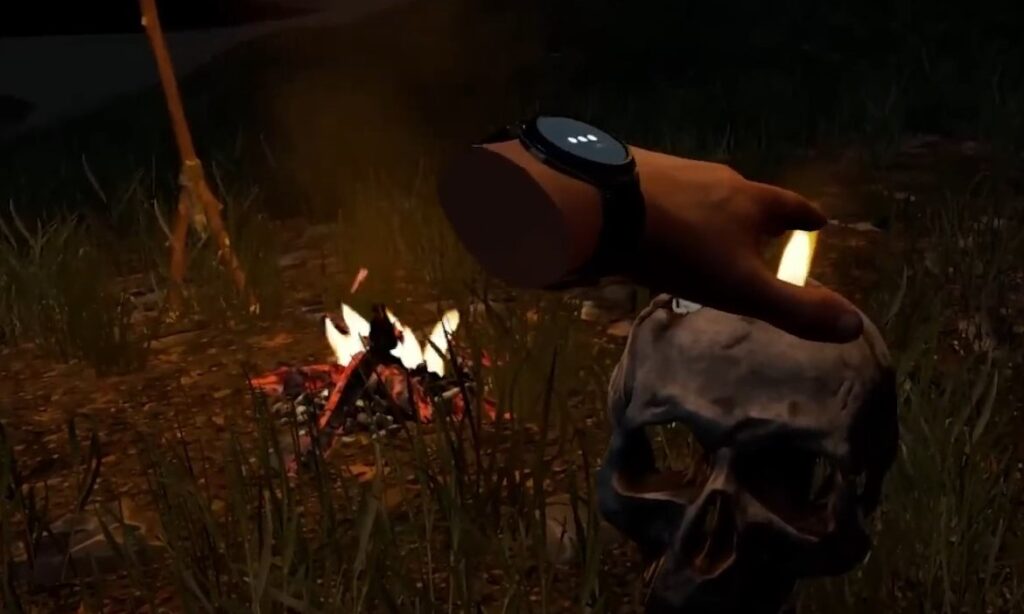
From a visual perspective, the game is like a feast. The forest appears alive with changing weather and a day-night cycle that will make you feel fear when the sun goes down. The sound design is also very good – it will keep making you look behind.
Is this VR experience perfect? No. The story can be a bit thin sometimes and some people may think that the early game is a little slow. However, these are minor gripes in an otherwise stellar experience.
To sum it up, The Forest VR is a game that every survival horror lover should try. It will make you scream from excitement and horror. We challenge you to play this game in VR. Just check this video review of The Forest in VR and you will understand why you should try.
How to Play the Forest in VR – Available VR Platforms
- Oculus Quest 2 and Quest 3 (Meta Quest 2 and Meta Quest 3)
The Forest VR is a PCVR game. How to play The Forest in VR in 2024? Buy a modern PC with up-to-date hardware and a video graphics card. Then invest in Meta Quest 2 or Meta Quest 3. To enjoy The Forest using these VR headsets, connect them to your PC in these ways:
- Oculus Link Cable. This cable is required for connecting your Oculus Quest 2 or Quest 3 to a PC or laptop. You need a USB-C cable. This method results in a more stable connection and good gameplay quality. Make sure that the Oculus app has been set up on your PC, along with all required drivers for graphic cards;
- Air Link. If you want to connect without wires, use the special device – Oculus Air Link. This method requires a good Wi-Fi network and a PC with powerful characteristics. Using the Oculus app, link your headset to your PC. Then turn on Air Link in the setup section of your headset’s menu. The performance may vary based on your Internet network quality;

- HTC Vive
The HTC Vive, a well-known platform, is also great for experiencing The Forest VR. You must do these steps to prepare it:
- Ensure you have the SteamVR software installed on your PC;
- Connect your HTC Vive headset and sensors according to the manufacturer’s instructions;
- Launch SteamVR and start The Forest through your Steam library;
- Valve Index
For those users who have the Valve Index headset – this is how to play The Forest in VR with it:
- Install the SteamVR software on your PC;
- Connect your Valve Index headset and base stations;
- Launch SteamVR, and then start The Forest from your Steam library;
- Windows Mixed Reality
If you have a Windows Mixed Reality headset:
- Make sure you have the Windows Mixed Reality Portal and SteamVR installed;
- Connect your headset and follow the setup instructions;
- Open SteamVR and start The Forest from your Steam library;
- Other PCVR Headsets
The Forest VR works well with other PCVR headsets, like the Pimax series. The process for setting it up is quite similar too:
- Install the necessary software for your headset (e.g., Pimax Experience for Pimax headsets);
- Connect your headset to your PC;
- Launch the relevant VR software and then start The Forest through your game library;
How To Play The Forest In VR Oculus Quest 2?
To play The Forest on Oculus Quest 2, you need to do some setup because the game is not natively supported by this headset. You will use a PCVR setup for playing The Forest in VR.
1) Requirements:
- Oculus Quest 2 headset;
- A gaming PC that meets the minimum requirements for The Forest;
- Oculus Link Cable or a strong Wi-Fi network (for Air Link);
- Oculus app for PC and SteamVR installed on your PC;
2) Set Up Oculus Link (Wired):
Install the Oculus App for PC
- Download and install the Oculus app for your PC from the Oculus website;
- Do as the guide on your monitor says, arrange your headphones and verify if they’re arranged accurately;
Connect Your Quest 2
- Use the Oculus Link Cable to connect your Oculus Quest 2 with the PC. Confirm that you have plugged the cable into a USB 3.0 port on your PC for optimal functioning;
- Wear your headset and permit data access when asked. Then, turn on Oculus Link by choosing “Enable” in the headset;
Launch Oculus Link
When the connection is confirmed, your headset will show you the Oculus Link interface. You will see the “desktop environment” where you can launch your PCVR games.
Launch SteamVR and The Forest
- In this virtual space, you ought to find the Steam launcher and check if SteamVR has been installed. If it’s not there yet, get it by downloading and installing from the Steam platform;
- Start SteamVR and go to your Steam library. Click on The Forest to begin playing the game using VR;
3) Set Up Oculus Air Link (Wireless):
- Make sure the Oculus app for PC is installed as described above;
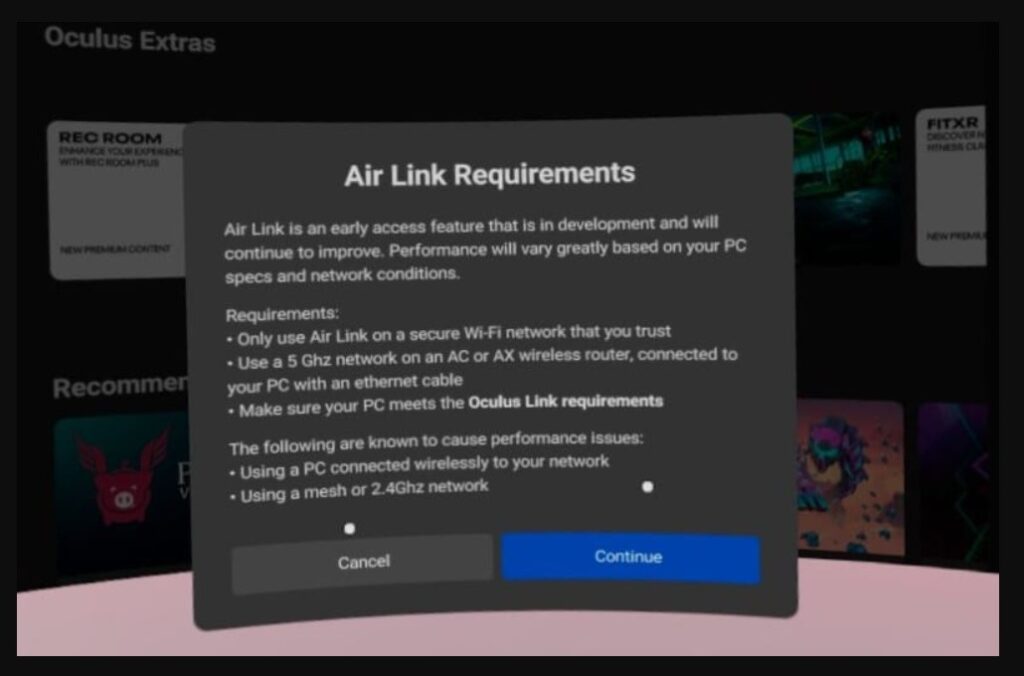
- Check if your Oculus Quest 2 is linked with a powerful and steady Wi-Fi connection. It is suggested to use a 5 GHz network for optimal functioning;
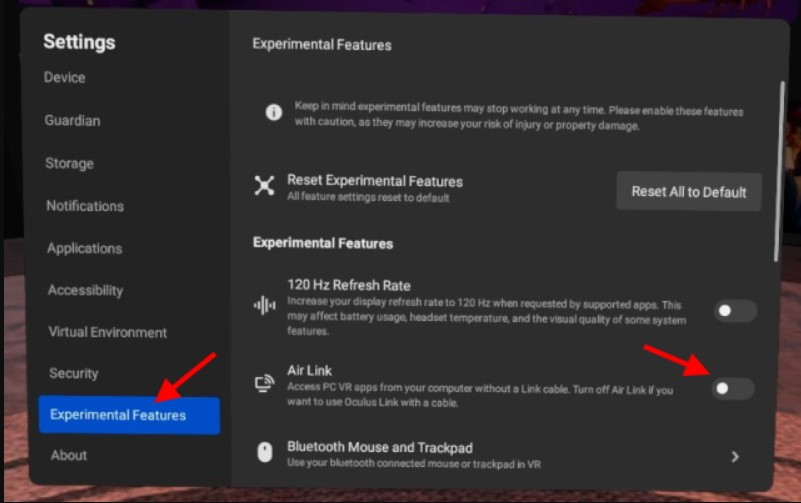
- Put on your headset and go to the Settings menu;
- Go to Experimental Features and enable Air Link;
- Once you put Air Link on, pick Pair to link your headset with the PC. You may have to do more steps shown on the screen to finish this process of pairing;
- Once you have successfully paired, return to the main menu of Oculus/Meta and choose Air Link to begin it;
- You will be taken to a virtual desktop environment similar to Oculus Link;
- Open SteamVR on your PC;
- Launch The Forest on your Steam library. Now, you may play it wirelessly in VR;
4) Adjust Settings for Optimal Experience:
- Change the graphics configurations in The Forest for improved performance, mainly if you experience problems with performance;
- Look into the in-game settings to find VR-specific options that can improve comfort and gameplay;
We also recommend joining the Reddit thread where people discuss different aspects of how to play The Forest in VR on various devices, including Oculus Quest (Meta Quest) devices.
How To Play The Forest In VR on Oculus Quest 3 – Technical Aspects
The procedure of setting up this game to Meta Quest 3 is the same as with Meta Quest 2. Now let’s check the major technical aspects of the VR version of The Forest that was released in 2018.
The Forest in VR feels like it should have been made for Virtual Reality since the initial game’s launch. Its survival mechanics, large open world, and dangers make me wonder why this game hasn’t had a VR version yet.
The Technical Stuff
The Forest VR has the potential to be an excellent VR game. Nevertheless, it is a “Beta” as seen in the main menu and it seems that the developers might have progressed from working on this port, thus resulting in its current unfinished condition. Performance problems are evident right away. Even if you have a good PC, the frame rates are not smooth and visuals become grainy. It is tough to enjoy the game properly with these problems. The quick movements such as when fighting can make matters worse because they cause delays in response that ruin your feeling of being completely absorbed into it.

The UI and Bugginess
The interface that users interact with in The Forest VR has its ups and downs. Sometimes, you may feel taken out of the experience when notifications like “Movement Blocked” keep popping up. Also, the crouching feature can have problems that affect how things look from different perspectives and camera angles. These “bugs” may pop up in various places and there are many of them. However, the developers try to fix them with frequent and regular updates.
Controls and Interactions
Control schemes are one more place where The Forest VR falls short. The reasoning for using your hands for specific actions may appear illogical sometimes because it leads to unintended equipment changes frequently. The requirement to manually switch between tools and interact with items through physical movements can be cumbersome and reduce the overall immersive experience.
Nonetheless, when you play The Forest in VR, you will notice many technical pros as well. The game’s large environment and natural attractiveness are easy to notice in virtual reality, with stunning views from great heights. Likewise, the sound design is of high quality and adds to the survival experience with ambient noises. Engagement with tools and weapons like slingshots, bows or the action of chopping trees and constructing in VR feels good.
How To Play The Forest In VR on PS4?
Unfortunately, as of 2024, you can’t play The Forest VR on any version of PlayStation VR (PSVR) because there’s no official VR support for PS4 yet. The game is mainly made for PCVR platforms and doesn’t have a native VR version on PS4.
But, if you are keen on VR experiences using PlayStation, there could be other games and titles for PSVR that give immersive gameplay. The Forest VR is just not supported by the developers and publishers. Maybe they will change their opinion someday and then we will definitely tell you how to play The Forest in VR on PS4 or PS5.
Frequently Asked Questions
Can you play The Forest in VR in 2024?
Yes, The Forest is VR-compatible but as of now, it’s only for PCVR platforms. If you want to play it in VR, then you must have a VR headset that can be connected to a PC like Oculus Quest 2 (using Oculus Link or Air Link), HTC Vive, Valve Index, or Windows Mixed Reality.
Can you play Sons of The Forest in VR?
Currently, Sons of The Forest does not have official VR support. The game is mostly for PC and does not possess a native VR variant. Therefore, players who desire survival experiences in virtual reality must search for different games that provide this feature with their headsets like Oculus Rift or HTC Vive.
You can try mods or other solutions made by third parties but they might not work properly and do not have official endorsement. If you want to play a survival game that has native VR features, then think about trying some other games that are compatible with VR devices. If Endnight releases the VR version of the sequel, we will surely tell you how to play Sons of The Forest in VR.
Can you play The Forest in VR on PS4?
No, you won’t be able to play The Forest in VR on PS4. There is no built-in version of this game for PSVR (both versions). Mainly, it is intended for playing on a PC and can be experienced in VR with the help of suitable PCVR headsets. PS4 players will need to look for other VR-compatible games for their console. There are already dozens of them.
Conclusion
Learning how to play The Forest in VR is understanding that the game also has technical difficulties and optimization problems on various VR devices. However, if you play it with suitable hardware, the game offers a distinct survival experience. The YaninaGames team is still here to guide you in the world of game development. Feel free to consult us or hire our team if you require professional 2D and 3D game development of any kind.